All stories · Article
Can a BFCM sales surge trigger a Shopify Payments reserve?
It can, on Shopify Payments. Shopify lists 5 risk indicators for reserves (holds on part of your payouts), [including volume surges and an increased refund rate]{indigo}, not as a closed list.
Share: WhatsApp · Telegram · X · Facebook · LinkedIn · Email
Both can rise at BFCM (Black Friday and Cyber Monday), so low chargebacks are not enough.
What risk indicators can trigger a Shopify Payments reserve?
On October 22, 2026, @casglb posted that Shopify had started holding 10% of every sale for 120 days, citing a higher chargeback risk, at what the post calls six weeks before Black Friday. The post describes a two-year-old luxury fashion brand with $10M in sales on Shopify, a 3% return rate and no earlier hold. The founder says the brand had not reached the threshold, though the post does not say which one, and this is the brand's own account of its case.
Cas@casglb🚨❌Shopify gives out millions in capital to merchants all over the world. But a 2 year old luxury brand with 31% returning rate and zero fraud? apparently that’s a risk.
Hopefully get some help from my connections 🙌🏽
Today Shopify put a hold on our payouts 10% of every sale locked for 120 days because of “increased chargeback risk”.
6 weeks before Black Friday, the moment we worked the whole year for.
We…Oct 22, 2026 · View on X
Chargebacks are only one item on Shopify's own list.
The reserves page in the Shopify Help Center names five risk indicators and says its checks are not limited to them: extended billing cycles, elevated chargeback activity, increased refund rate, industries with extended delivery timelines, and significant volume surges. Shopify's help page ties the volume-surge line to difficulty managing customer demand and possible fraud. A BFCM rush that outruns stock or shipping can fit that line, and refund rates can move after a heavy sale.
So a store with very few disputes can still match a line on that list during BFCM.
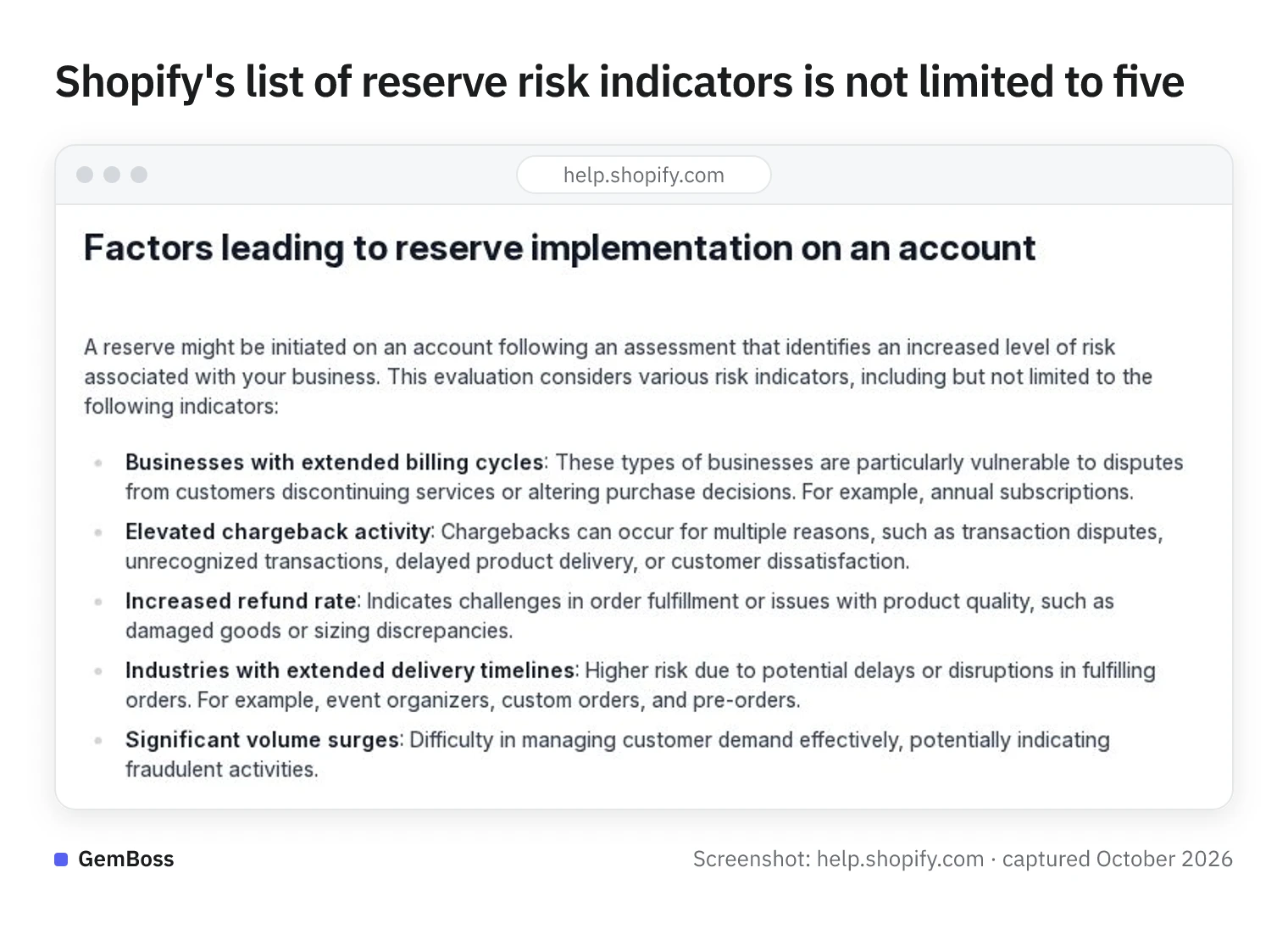
Screenshot of Shopify Help Center, captured in October 2026.
If one of those lines fits your store, the next question is what a reserve does to your cash.
How does a Shopify Payments reserve affect your BFCM cash flow?
Shopify describes a reserve as "a temporary hold on a portion, in some cases a full amount, of transactions processed through Shopify Payments for a specified period." It comes in two forms: a fixed amount held for a set time, or a percentage of each transaction. The help page uses 120 days as an example and the period is set in each reserve's terms; held money goes back into your payouts when the reserve expires, if no extension is required.
If you pay for the next stock order and the next ad top-up from the latest payout, the timing is the problem.
If a percentage reserve is on, the held share of each holiday sale comes back on the reserve's schedule, whatever your supplier's due date.
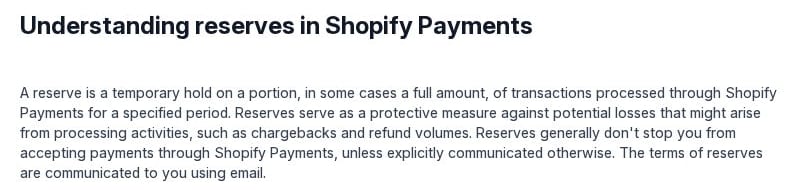
Shopify's definition of a reserve on help.shopify.com, captured in October 2026.
How exposed a store is depends on how it takes payments and what it sells. If you do not use Shopify Payments, this mechanism does not apply to you. If you sell preorders or annual or other long-billing-cycle subscriptions, or ship slowly, the list already has extra lines that fit your model.
Can a store with low chargebacks still have its Shopify Payments funds held?
A clean record helps, but it is not the only thing checked. On October 5, 2026, @hamzabandz posted that Shopify Payments had been turned off on their store and €84,000 frozen for up to 120 days. By the poster's numbers, the store had 2,196 orders, 2 chargebacks (0.09%) and a 0.82% refund rate.
The reason given was that identity verification was not complete; the poster says it already was. They also said they could not pay suppliers and freelancers.
Hamzabandz🦅@hamzabandz@Shopify @ShopifySupport @ShopifyEng @tobi Our Shopify Payments account was disabled just 2 hours ago. €84,000 is now frozen for up to 120 days and our customers can no longer pay on our store.
This is bringing our business to a complete stop overnight. We need urgent help.
The facts, all verifiable:
• 2,196 orders
• Only 2 chargebacks — 0.09%
• 0.82% refund rate — mainly customers who changed their mind after…Oct 5, 2026 · View on X
Other factors outside chargebacks come up too, according to @adamhabona. The post says Shopify's risk page lists "rapid increases in sales volume" as a review factor, and that Shopify also looks at other businesses the same owner runs. The post ends by promoting the author's own payment service.
There is another side. @Seanfrank says that about twice a week someone asks for help unbanning an account on Meta, Shopify or PayPal, and that about half the time the account was running ads with absurd claims while its owner said it was banned for no reason.
Public posts show one side of each case, so weigh them as the poster's account next to Shopify's own list.
How do you check for a Shopify Payments reserve before BFCM?
- Open the Reserve tab. In your Shopify admin, go to Finance > Payouts: if there is no Reserve tab, Shopify says your account has no reserved funds; if there is one, it lists the held transactions. If nothing is held, skip step 2, but still plan BFCM restocks and ad top-ups so they do not depend on every holiday payout.
- If a reserve is on, check the appeal deadline first. To appeal, reply to the email that sets out the reserve terms within the timeframe that email gives. If the email lists requirements for removal instead of inviting an appeal, the help page says the reserve can't be appealed by reply and is removed automatically once you meet them. Separately, Shopify reviews the account before a reserve expires and decides whether to keep, reduce or raise it. While the reserve runs, set stock and ad budgets from the amount that actually reaches your payouts.
- Keep identity documents ready, and check the notice rules before any change. According to @adamhabona, Shopify's terms ask for 30 days' notice before you change your business name and notice within 3 days after an ownership change. If no change is planned before the holidays, the documents are the only part that applies.
Sources
- @casglb · x.com
- reserves page in the Shopify Help Center · help.shopify.com
- @hamzabandz · x.com
- @adamhabona · x.com
- @Seanfrank · x.com