All stories · Hot News
Claude will stop asking for your approval before it takes action
Claude is about to stop asking you to approve every step of its work.
Share: WhatsApp · Telegram · X · Facebook · LinkedIn · Email
On October 22, Anthropic announced on X that starting the following week, sessions in Claude's web, desktop and mobile apps will run in auto mode by default on Pro, Max and Team plans. Instead of waiting for you to approve each action, an automated check blocks risky ones, and you can switch back to manual at any time.
Claude@claudeaiStarting next week, sessions across Claude web, desktop, and mobile apps will run in auto mode by default on Pro, Max, and Team plans.
Rather than asking you to approve each step, an automated check blocks risky actions. Switch back to manual anytime.Oct 22, 2026 · View on X
If you use Claude for store work, it may now run more steps back to back on its own. The thing to prepare now is a clear list of the tasks you still want to approve yourself.
What auto mode changes in a session
Anthropic's update page adds a few details the X post leaves out. Auto mode applies to new sessions in most Claude apps, not all of them yet. Every action passes through an automated check: safe actions go ahead, while risky ones are blocked and Claude looks for another route.
On the Enterprise plan, admins will get an email before auto mode becomes the default for their organization. The update page gives no specific rollout date, only "next week".
Why Anthropic is dropping step-by-step approvals
This change isn't entirely new.
Anthropic made auto mode the default in Claude Code (its coding tool) for Pro, Max and Team plans starting August 14, and the reason it gave at the time was the approval habit itself. According to Anthropic, Claude Code users approve 97% of permission prompts, a rate that suggests many people click through by reflex instead of reading each command.
That habit showed up in a controlled study with 1,053 paid testers working in a test environment. Human reviewers caught only 13.6% of the dangerous commands planted in their sessions, while auto mode caught 89%. These figures were measured on Claude Code, not the chat apps, and the update page states that the data in the article is specific to Claude Code.
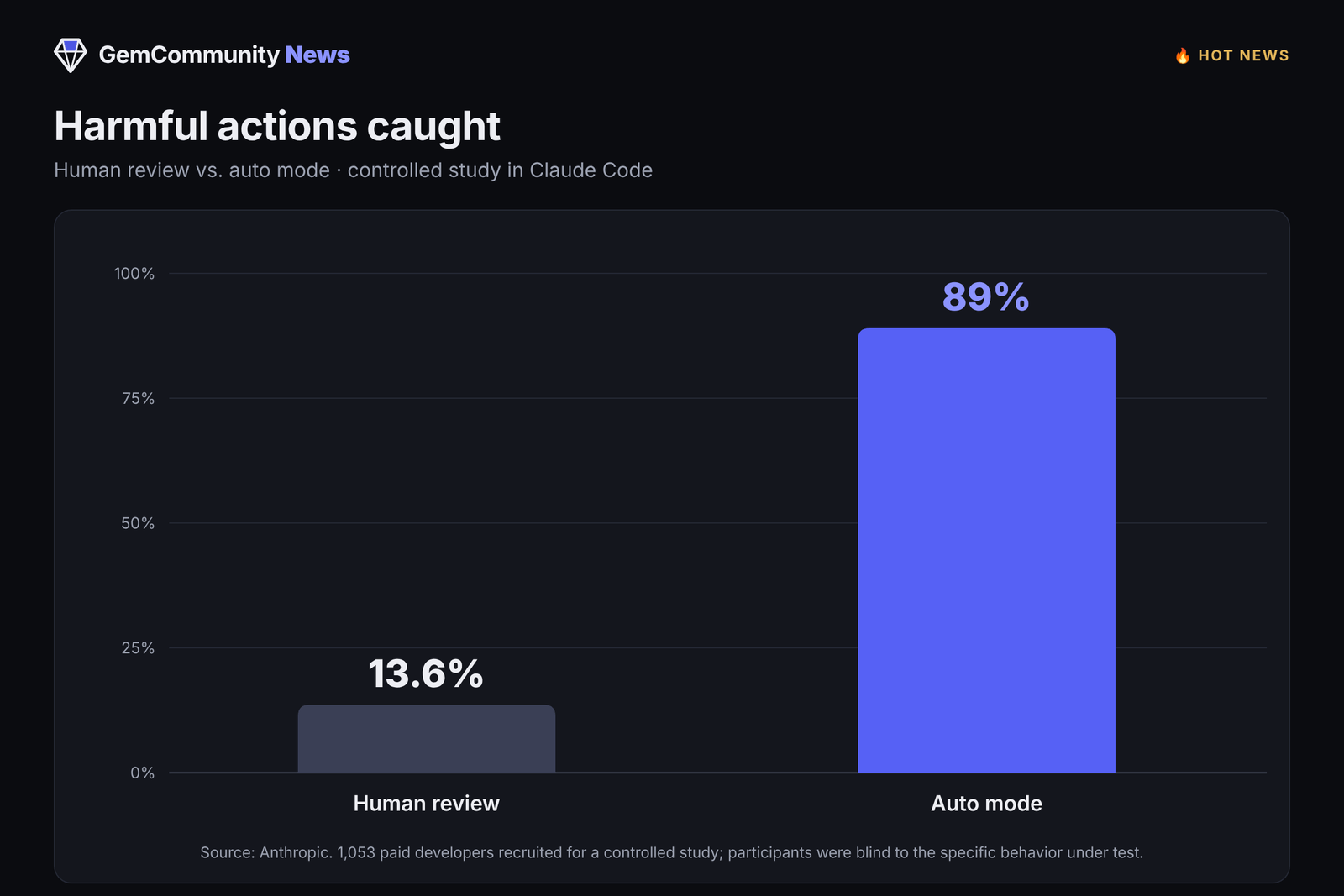
Anthropic says it used those test results to strengthen auto mode across its products.
Which tasks to switch back to manual
In the same Claude Code article, Anthropic acknowledges that auto mode relies on classification systems and therefore "does not eliminate risk." It still recommends reviewing Claude's actions yourself for high-stakes changes to production systems.
In our view, that advice also fits running a Shopify store. If you've connected Claude to your store's tools, switch to manual mode before handing it tasks that are hard to undo or that reach customers directly, such as:
- Bulk-editing prices or inventory on a live store
- Deleting products, collections or customer data
- Sending emails or messages to customers on your behalf
For read-and-draft work, like summarizing product reviews or drafting descriptions, letting auto mode run is usually less of a concern, because you still read the output before using it.
The announcement doesn't say where the mode switch sits in the chat apps. In Claude Code, Anthropic says to press Shift+Tab in the command line or use the mode dropdown in the desktop app. When auto mode reaches your account, find that switch before you give Claude anything important. If your team shares a Team plan, agree in advance on which tasks need manual approval so everyone works the same way.