All stories · Article
Meta CPM hit $21.45 in October. Higher ad costs put Shopify conversion rates to the test
Before increasing Meta ad spend for Black Friday, Shopify sellers should make sure their stores can convert the traffic profitably. Rising CPMs make every click more expensive, but checkout issues, broken upsells and inaccurate tracking can make each purchase even costlier.
Share: WhatsApp · Telegram · X · Facebook · LinkedIn · Email

Black Friday falls on November 27, 2026, followed by Cyber Monday on November 30. As more brands compete for shoppers, Meta advertising costs are already drawing attention.
But a higher CPM does not automatically mean a higher cost per purchase. What matters is how efficiently a store turns paid traffic into profitable orders.
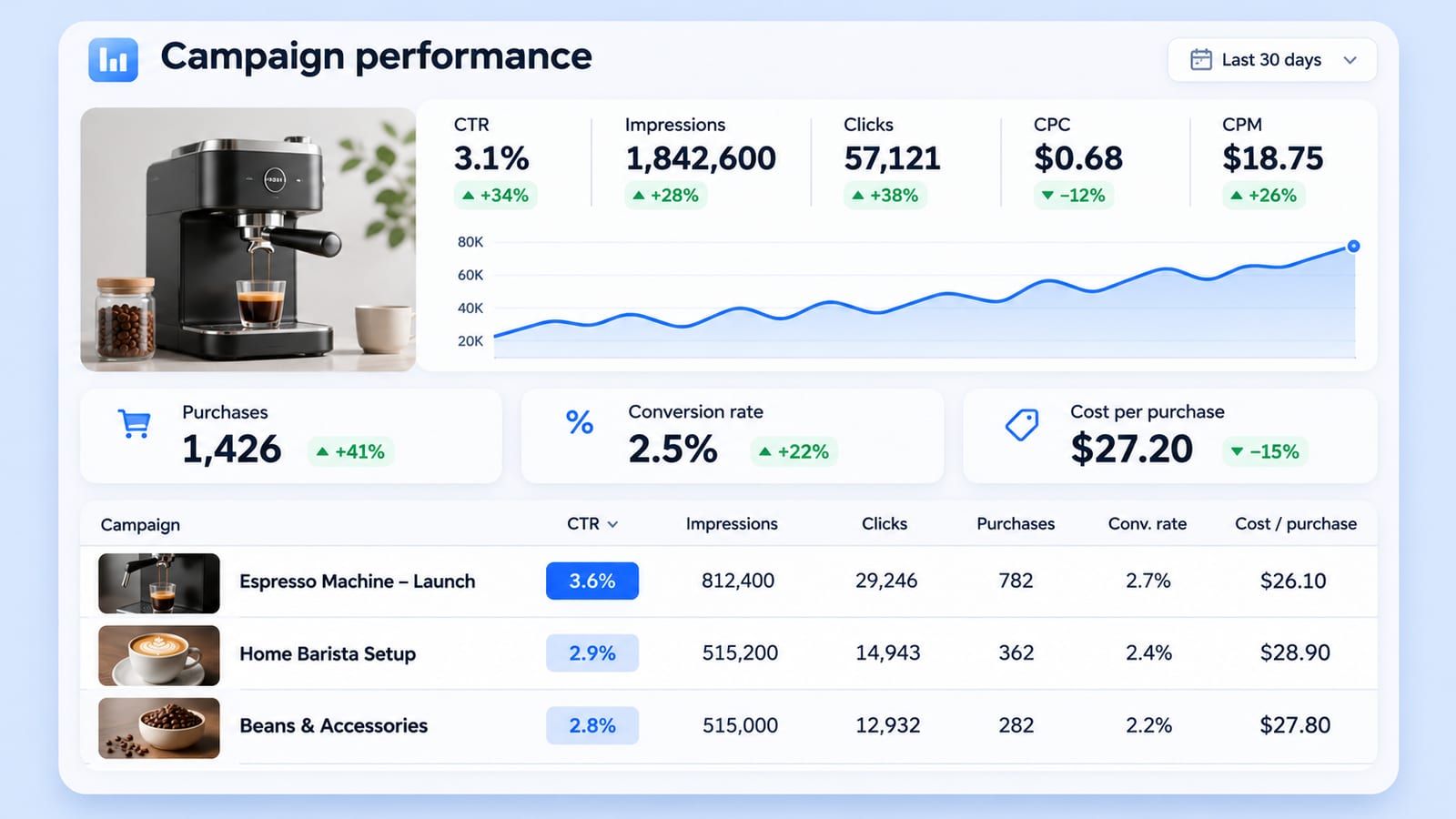
Here is what the latest figures show, why conversion rates matter more than CPM alone, and what Shopify sellers should test before scaling.
Are Meta ads really more expensive this Black Friday?
Meta advertising is getting more expensive ahead of BFCM 2026, but three widely shared figures measure different things and should not be combined.
- +14%: Meta's global average price per ad increased year over year in Q3 2026.
- $21.45: Birch reported the average CPM for US-targeted Facebook campaigns in October 2026, up 34.6% year over year.
- +84%: Lebesgue recorded a median CPM increase on Black Friday 2025 compared with September 2025. This is historical data, not a forecast for Black Friday 2026.
The distinction matters. Meta's 14% figure covers its advertising business globally, Birch's $21.45 is a US Facebook CPM benchmark, and Lebesgue's 84% measures a one-day seasonal spike in 2025. They cannot be combined into a single estimate of how much more Shopify sellers will pay this November.
Higher CPMs don't necessarily mean higher acquisition costs
A higher CPM means paying more for 1,000 ad impressions. It does not tell you how many of those impressions turn into clicks or purchases.
Lebesgue's analysis of $22.6 million in Meta ad spend from September to November 2025 found that, during Black Friday week, the median brand experienced:
| Metric | Change vs. September 2025 |
|---|---|
| CPM | +59% |
| Conversion rate, purchases per link click | +48% |
| Cost per purchase | -20% |
| Meta-reported ROAS | +19% |
Conversion rates improved enough to offset the higher cost of impressions. Brands paid more to reach shoppers but acquired purchases more efficiently.
This does not prove that higher CPMs caused better conversion rates. Stronger purchase intent, seasonal offers and changes in traffic mix may all have contributed. Lebesgue's figures also represent its own customer data, not the entire ecommerce market.
The practical lesson is simple: do not make budget decisions based on CPM alone. Monitor cost per purchase, contribution margin and actual store revenue alongside CPM.
How much CPM can your store afford?
Instead of asking whether a CPM is expensive compared with the market, calculate the maximum CPM your store can afford while remaining profitable.
Where:
- CTR: The percentage of ad impressions that generate link clicks.
- Conversion rate: The percentage of those clicks that become purchases.
- Contribution margin per order: Revenue remaining after product costs and variable costs, but before advertising spend.
The formula connects three parts of your funnel: the cost of reaching shoppers, the likelihood that they click, and the profit generated when they buy.
If conversion rate falls because of a broken checkout or an incorrect discount, your break-even CPM falls too. You can no longer afford to pay as much for impressions.
That is why a store should check its buying journey before increasing its acquisition budget.
What should one test order check before you scale?
A test order should go beyond confirming that the checkout page loads. It should follow the same customer journey as closely as possible, from the landing page to the final confirmation page.
Run the test on a mobile device. If your customers use both iOS and Android, test both environments.
Here are five areas to check.
1. Does every upsell charge for the correct product?
Post-purchase upsells deserve particular attention.
In a one-click upsell flow, the original payment may already have been processed. The customer can then accept an additional offer using the payment details already on file.
Check that:
- The upsell displays the correct product and variant.
- The product ID points to the intended item.
- The displayed price matches the amount charged.
- Declining an offer does not add the product to the order.
- Accepting an offer adds only the selected item.
A wrong product ID can result in a customer being charged for an item they never intended to purchase.
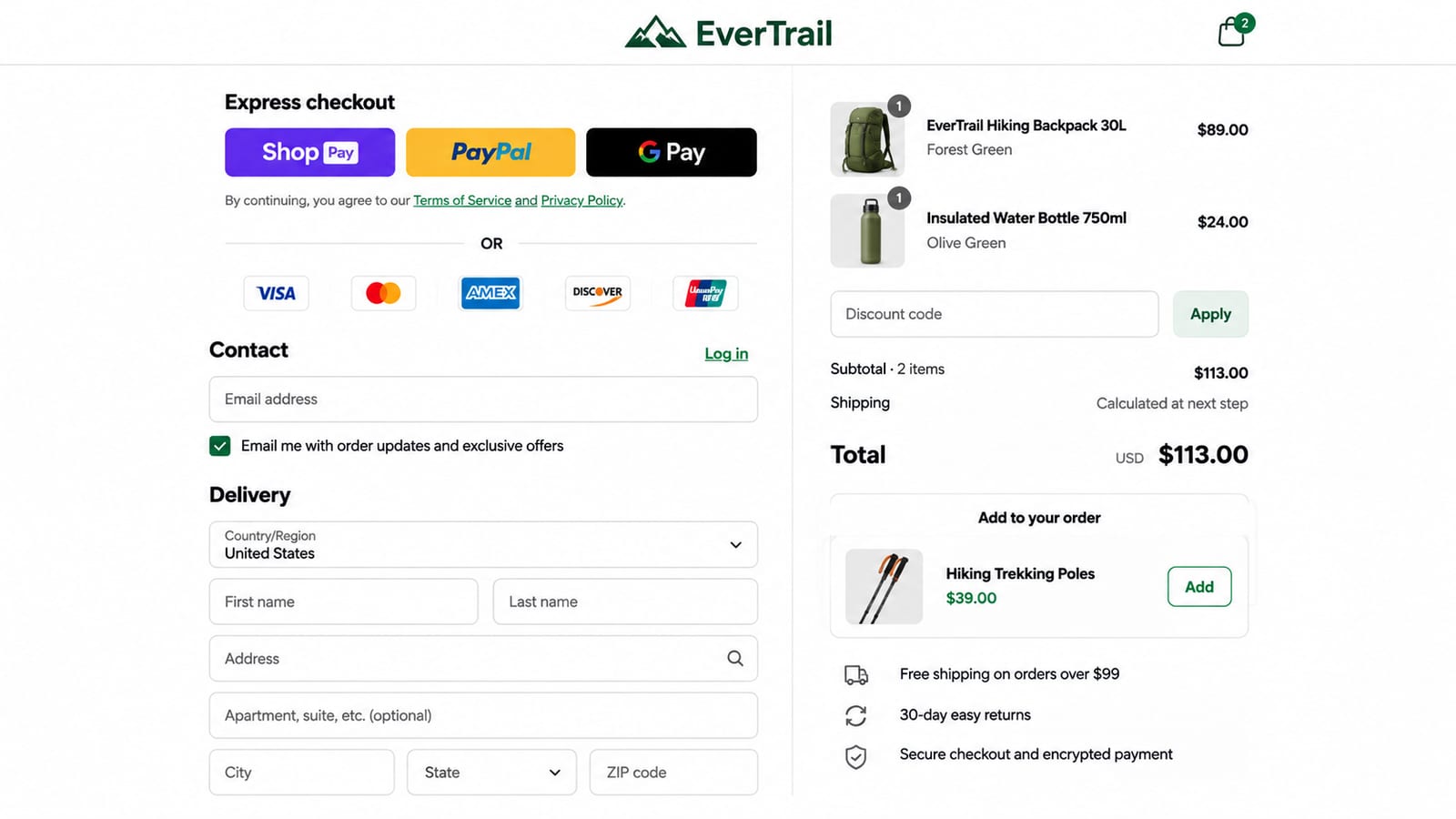
2. Do the cart, discounts and order total match?
Test the entire pricing journey, not just the discount code itself.
Check:
- Whether the correct discount is applied.
- Whether two promotions conflict or stack unexpectedly.
- Whether shipping and taxes are calculated correctly.
- Whether the final checkout total matches the order recorded in Shopify.
- Whether an upsell changes the order total as expected.
A promotion that works on the landing page but fails at checkout can create abandoned carts, customer complaints and additional support work.
3. Does the payment and order confirmation process work?
Complete the checkout and verify what happens after payment.
Check that:
- The payment is processed for the expected amount.
- The order appears correctly in Shopify.
- Inventory is adjusted as expected.
- The customer receives the correct confirmation email.
- Shipping and tax information are correct.
Shopify's official test-order guide recommends testing checkout, order processing, inventory, shipping, taxes and email notifications.
Shopify supports simulated transactions through its test payment gateway and Shopify Payments test mode. These test orders do not appear in payouts or reports. If a third-party post-purchase funnel requires a different testing method, follow that provider's instructions before attempting a live transaction. A real order followed by a refund may incur payment processing fees.
4. Does the Purchase event fire once with the correct value?
Your advertising reports are only useful if conversion events are recorded accurately.
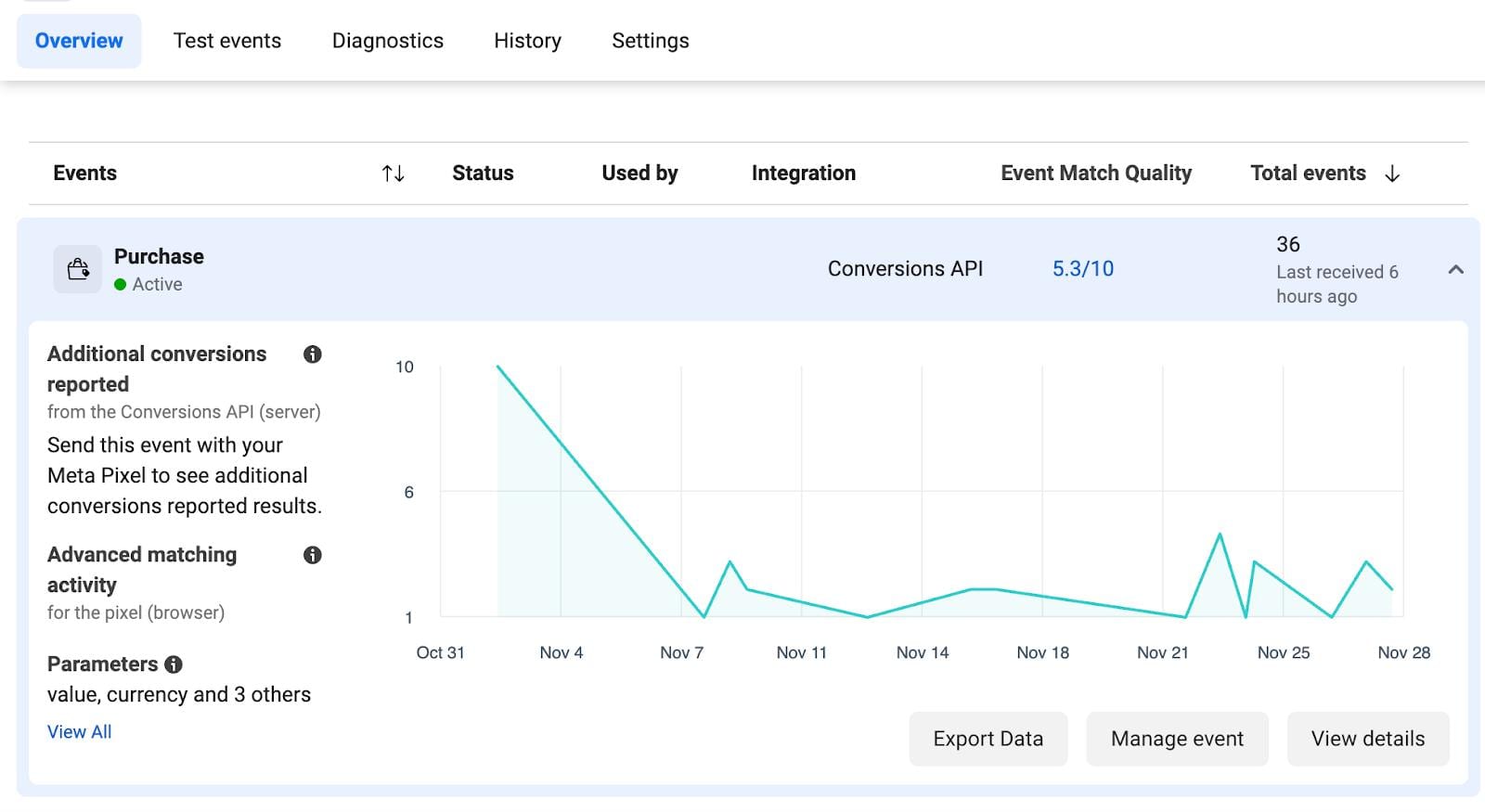
During the test, verify that:
- The Purchase event fires when an order is completed.
- The event reports the correct order value and currency.
- The same purchase is not counted multiple times because of duplicate pixel installations or conflicting tracking scripts.
- The event is not triggered simply by refreshing the confirmation page.
Shopify warns that installing the Meta pixel through multiple methods can produce duplicate or incorrect reporting. See its Meta pixel setup documentation.
For custom pixels, Shopify also provides a Pixel Helper testing process to inspect events received on individual pages.
One important distinction for November 2026: Meta's new Measure conversions on customer devices setting is scheduled to start rolling out from November 12 for eligible setups. It can help Meta match additional purchases to advertising activity without changing the underlying number of Shopify orders. It is not the same as a duplicate Purchase event. Check the setting in your own Events Manager and compare Meta-attributed purchases with actual Shopify orders. See this November 2026 measurement update.
5. Do subscriptions and recurring charges work as promised?
Subscription problems may not appear during the first purchase.
A customer can complete the initial checkout successfully, only to discover that the recurring billing interval or amount is wrong when the next payment is due.
Check:
- The initial subscription price.
- The recurring price after any introductory offer.
- The billing interval, such as monthly or quarterly.
- The next scheduled charge date.
- Whether the customer receives the correct subscription confirmation.
- Whether cancellation and subscription management work as expected.
Do not assume that a successful first payment proves the subscription configuration is correct. Verify recurring billing separately.
A page that loads successfully is not proof that the buying journey works. The order must be correct from the customer's first click through payment, upsells, tracking and any future recurring charges.
When should you run the test, and who can skip it?
Run the test before the main BFCM traffic arrives, ideally after making changes to your checkout, offers, discount rules, tracking or subscription settings.
If you are using a third-party checkout or post-purchase funnel, include every step in that flow. A test of Shopify's standard checkout alone may not cover the additional functionality.
Stores that do not run paid advertising are less exposed to seasonal Meta CPM increases. However, testing the purchase journey is still useful whenever checkout or payment settings change.
For stores running Meta campaigns, the priority is to establish a clean baseline before scaling. From November 12, eligible Meta measurement settings may also affect reported conversions, so keep actual Shopify orders as a separate reference point.
Frequently asked questions
Why are my Meta CPMs so high?
CPM reflects the cost of 1,000 ad impressions. Around Black Friday, more advertisers compete for shoppers, which can push auction prices higher. However, your CPM also depends on audience, campaign objective, placements, geography and ad performance. Compare your own account with a consistent historical baseline rather than relying on one market-wide benchmark.
Should I fix my funnel before scaling ad spend?
Yes, if your funnel has unresolved problems that could affect purchases, payment accuracy or tracking. Higher traffic will not fix a broken checkout. Test the customer journey first, then scale campaigns based on cost per purchase, contribution margin and actual sales.
Sources · 7 · investor.atmeta.com, lebesgue.io, theecommerceoperator.substack.com +2
- Meta, Q3 2026 Results, October 21, 2026.
- Lebesgue, Meta Ads on Black Friday: Why Higher CPMs Can Still Pay Off, October 16, 2026.
- E-Commerce Operator, Black Friday CPMs Started Climbing, Birch data cited in the newsletter.
- Shopify Help Center, Placing a Test Order.
- Shopify Help Center, Meta Pixel.
- Shopify Help Center, Testing Custom Pixels.
- Kurums, Meta On-Device Conversion Measurement: November 12 Notes, November 8, 2026.
Ask AI next
- How do I calculate contribution margin per order from Shopify data to use in a break-even CPM formula?
- How should I set Meta campaign budgets and bid caps for Black Friday week when CPMs spike?
- Which Meta setups are eligible for Measure conversions on customer devices, and how does it match purchases?
- Which tools show Meta cost per purchase next to actual Shopify orders and revenue in one daily view?
- How do Black Friday Meta CPMs in markets outside the US compare with US-targeted campaigns?