All stories · Hot News
Shopify Fall '26 Edition for developers: what reaches your store
On October 28, 2026, Shopify published the Fall '26 Edition for developers. Most of it is tooling for people who build apps, and you don't have to install anything to see the parts that reach your store.
Share: WhatsApp · Telegram · X · Facebook · LinkedIn · Email

Merchants see three things from it. Two were live before the Edition: partner details on collaborator requests, and tools that let browser agents shop your store. The third is app activity in Shopify Analytics.
- What shipped: Shop.dev and shop.md for agent shopping, Universal Checkout for partners, Catalog API filters, an app security check in the Shopify CLI, and a rebuilt Hydrogen, now generally available.
- What's new in your admin: apps can send events, so their activity can appear next to your store data in Shopify Analytics.
- Who can skip most of it: stores that don't work with developers or run a custom Hydrogen storefront.
- What to do now: read the partner details on the next access request.

Shopify's Fall '26 Edition post for developers, on www.shopify.com, captured in October 2026.
Is my store already open to AI shopping agents?
Yes, since before the Edition. The developer post calls every Shopify store "agent-ready by default." WebMCP tools on every Liquid and Hydrogen storefront and checkout let a browser agent search products, change the cart and finish checkout once the buyer agrees.
The storefront tools went live on August 5, 2026, per Shopify's developer changelog, with nothing to install or configure. Checkout tools followed on September 28, 2026, and they hand control back to the buyer for steps like 3D Secure. The August changelog adds that agent support is limited to Chromium-based browsers through an origin trial, so there is nothing for you to set up here.
A new theme architecture is further off: themes built on it are ready for Sidekick in Canvas, which is still in early access.
What should I check the next time a developer asks for access?
Each new collaborator request shows four partner details, which Shopify adds once the partner has verified their identity. You see them in the admin and in the request email: how long the partner has been on Shopify, where the account was registered, where the request came from, and a rough range of stores the partner works with. This has been in place since July 30, 2026, per the changelog post on partner details, which says some bad actors are trying to use collaborator accounts to social-engineer their way into real merchant stores.
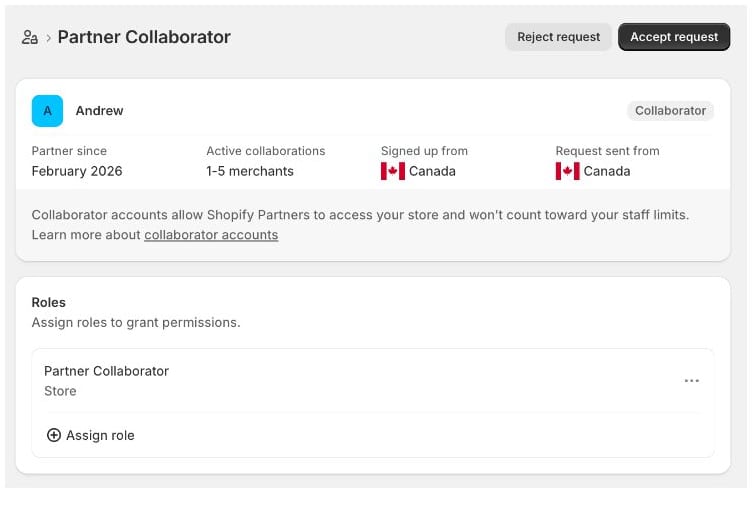
Shopify's example of a collaborator request with the four partner details, on shopify.dev, captured in October 2026.
Read each detail for what it is. The store count is a range, and it only counts stores on a paid plan. The details appear only on new requests; requests you already accepted are not affected.
To review a request, open Users in your admin and filter by Requests, per Shopify's Help Center. The request also flags a possible VPN; per the Help Center, that alone doesn't make a request unsafe, but it is a reason to confirm the request with the partner before you accept.
Treat the details as context, and give only the permissions the job needs.