All stories · Article
Shopify simplifies AI checkout with Cart and Checkout permalinks
Shopify added /buy links on October 28, 2026, per Shopify's developer changelog. With one link, an AI agent can send a shopper straight to your checkout.
Share: WhatsApp · Telegram · X · Facebook · LinkedIn · Email
The link only builds the cart: your store data decides what lands in it, and one bad variant means no cart at all.
The /buy link handles the trip to checkout, except your data
A /buy link adds items by variant ID and prefills details such as the buyer's email. It also sets country and language, applies discount codes and can ask for Shop Pay. If a link fails, the shopper lands on a chosen page or your storefront instead of an error page.
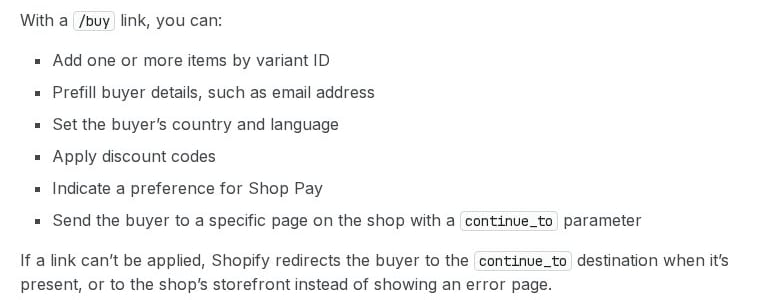
What a /buy link can do, from the changelog entry on shopify.dev, captured in November 2026.
You don't have to switch anything on. Per Shopify's permalink docs, Shopify hosts the link for you. Opening a link never places an order or charges the buyer, who can still edit every prefilled field.
LinkedIn posts on agent shopping kept making one point in late October and early November 2026. The plumbing is done, and the store data is not. An agency page, @digimar-solutions-nj, put it plainly: "An AI shopping link can prepare a cart or checkout, but it cannot guarantee price, availability, discount acceptance, or payment." @enrichio-inc, which sells a catalog tool, said what is left is the part no platform can do for a store.
The rest sits in your admin.
Three ways the checkout cart can drift from the link
The docs describe three cases.
- A shade or size is sold out. Shopify adds only the stock left, or drops the item, so a bundle can arrive with a piece missing.
- The discount code doesn't apply. Shopify still creates the cart, without the discount.
- One item fails for another reason. If Shopify can't add an item for any reason other than stock, it creates no cart, even for the items that were fine. The shopper goes to the chosen page or your home page.
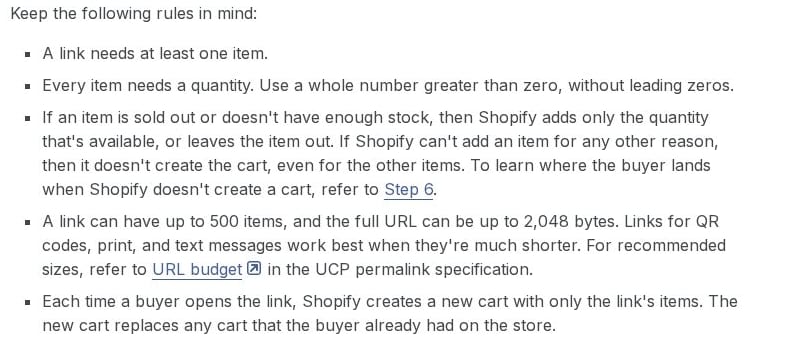
The rules for adding items in Shopify's permalink docs on shopify.dev, captured in November 2026.
For a bundle, every variant in the link is one more chance to lose the whole cart. Each opened link also replaces any cart the shopper already had on your store.
Which stores are most likely to hit this?
Multi-variant bundles and Black Friday codes give the cart the most places to drift.
Subscription products have their own limit. The docs say every item is added as a one-time purchase, and a subscription-only product gets no cart. Stores that don't sell through the online store, a headless storefront or Shopify Catalog get no carts from these links at all.
At checkout, the shopper meets your store. In an E-Commerce Times article by Jack M. Germain, Wayvia CEO Anthony Ferry says a retailer or brand should be accountable for inaccurate price, stock or product data it supplies: "The merchant that accepts an order still has to deliver what it agreed to sell and deal with returns."
Open a /buy link for your best-selling bundle
- Find the variant ID of each item in your best-selling bundle.
- Build the link in the format from the docs, with your Black Friday code:
https://yourstore.com/buy/VARIANT_ID:1,VARIANT_ID:1?discounts/codes/0=YOURCODE - Open it in a browser and check the items, quantities and discount at checkout. Opening it places no order and charges nothing.
On a live store, Allbirds' public UCP profile lists https://www.allbirds.com/buy as the base address, and a link needs at least one item after it. Its public product data for Men's Tree Runner, read on November 3, 2026, showed size 8 in stock and size 9 sold out. A link with both sizes looks like this: https://www.allbirds.com/buy/33179624669264:1,33179624702032:1. Per the docs, it should reach checkout with size 8 only, if stock hasn't changed.
Any mismatch points back to your admin data.
Sources · 8 · shopify.dev, linkedin.com, ecommercetimes.com +1
- Shopify's developer changelog · shopify.dev
- Shopify's permalink docs · shopify.dev
- @digimar-solutions-nj · linkedin.com
- @enrichio-inc · linkedin.com
- E-Commerce Times article · ecommercetimes.com
- Allbirds' public UCP profile · allbirds.com
- public product data for Men's Tree Runner · allbirds.com
- https://www.allbirds.com/buy/33179624669264:1,33179624702032:1