All stories · Hot News
Using Shopify apps? Ask about Shopify's token switch by Jan 15
Public apps that still use non-expiring offline access tokens must switch to expiring tokens before January 1, 2027, according to the Shopify developer changelog of October 27, 2026.
Share: WhatsApp · Telegram · X · Facebook · LinkedIn · Email
Public apps are App Store apps, and the token is the key they use to call Shopify's Admin API.
January 1 is not the day your installed apps stop.
On that date, Shopify delists apps that have not switched. New installs of those apps are blocked, but apps already installed on stores can keep making the affected API requests until April 1, 2027. You do not have to reinstall anything: Shopify's May 20, 2026 notice to developers says "Merchants don't need to reinstall, as your app exchanges existing tokens through code."
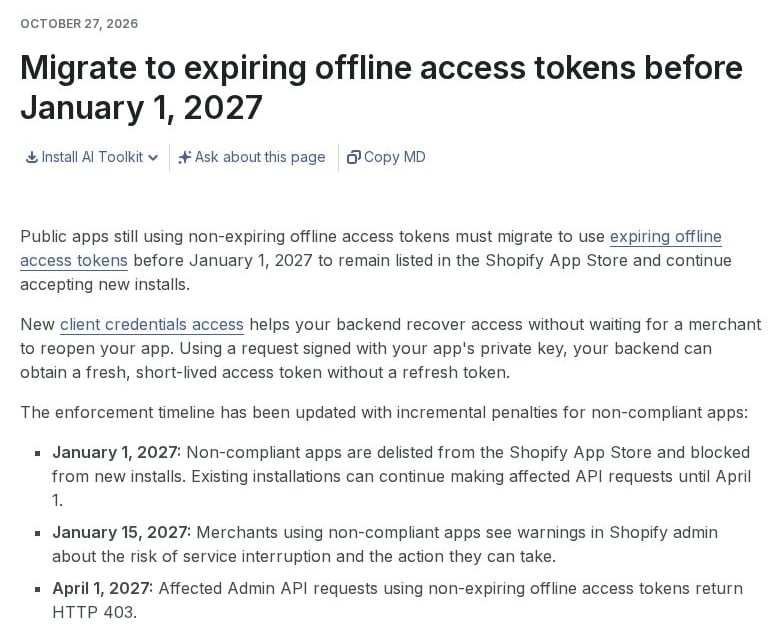
Shopify's three-step timeline for apps still on non-expiring tokens, on shopify.dev, captured in October 2026.
- What changed: the May 20, 2026 notice said apps still on non-expiring tokens would receive authentication errors after January 1, 2027. The October 27, 2026 timeline turns that into three steps.
- Why Shopify wants the switch: Shopify says a leaked non-expiring token stays valid indefinitely, while an expiring token works for at most 60 minutes and is then replaced automatically.
- Your part: before January 15, 2027, ask the makers of the App Store apps you rely on whether they have switched, because the code change is theirs. If every app on your store is a custom app or one you created yourself, there is nothing to do.
What happens to the apps on your store on January 1, January 15 and April 1, 2027?
The January 1 step only touches App Store listings and new installs. From January 15, 2027, if you use an app that has not switched, you see a warning in Shopify admin. The warning covers the risk of service interruption and the action you can take.
On April 1, 2027, Admin API requests on non-expiring tokens return HTTP 403: Shopify refuses them. From then on, the order, inventory or email work such an app does for your store may stop.
Shopify has not moved the deadline for developers. Its security update of October 27, 2026 says January 1 is the migration deadline. Shopify says the January 15 and April 1 dates are there to give merchants time to get ready, and developers should not count them as extra time to migrate.

Shopify's security update on the deadline and the apps it leaves out, on shopify.dev, captured in October 2026.
Which stores and apps are not affected by the offline token change?
Custom apps, apps that merchants create themselves, and online access tokens are not affected, according to the same security update. If every app on your store is a custom app or one you created yourself, this change does not reach you.
What should you do before the warnings appear?
Start with the apps from the Shopify App Store that handle orders, inventory or email, because that is the work that may stop on April 1, 2027. Then ask each app's maker whether it has moved to expiring offline access tokens, and try to get an answer before January 15, 2027. If a maker cannot give a date for an app that handles orders, inventory or email, line up a replacement you could move to before April 1, 2027, and watch for the Shopify admin warning from January 15, 2027.
If you plan to add one of these apps to another store after January 1, 2027, ask its maker first: apps that have not switched are blocked from new installs. Shopify's October 27, 2026 posts do not say how reinstalling an app on the same store is treated.
The token switch happens in each app's code, so the work sits with the app's maker. Your job is to ask before January 15, 2027, knowing that an app that has not switched keeps working until April 1, 2027.